Cat6a is the better choice if you need faster speeds, longer distances, and future-proof network performance, while Cat6 works fine for standard home and small office setups.
Choosing between Cat6 and Cat6a can be confusing, especially with so many technical specs to compare. Both cables look similar but perform very differently under real-world network demands.
Cat6 cable supports speeds up to 10 Gbps but only over short distances of around 55 meters. It’s a budget-friendly option ideal for basic networking needs.
Cat6a cable, on the other hand, supports the full 10 Gbps speed up to 100 meters with better shielding against interference. This makes it perfect for businesses and data-heavy environments.
In this guide, we’ll break down the key differences between Cat6 and Cat6a so you can pick the right cable for your specific networking requirements and budget.
Defination:
Cat6 (Category 6): A twisted-pair Ethernet cable standard designed to support speeds up to 10 Gbps over short distances (up to 55 meters) and 1 Gbps reliably up to 100 meters. It’s a cost-effective choice for home networks and small offices where extreme speed over long distances isn’t required.
Cat6a (Category 6 Augmented): An enhanced version of Cat6 that supports 10 Gbps speeds over the full 100 meters, thanks to improved shielding that reduces crosstalk and signal interference. It’s thicker and slightly more expensive than Cat6, making it the preferred choice for data centers, enterprise networks, and future-proof installations.
Cat6 or Cat6a : Quick Answer
Cat6 is usually enough for homes and smaller networks, while Cat6a is a better choice for long 10 Gbps connections and future-proof installations.
Cat6 and Cat6a are Ethernet cable categories used for transmitting data across wired networks.
The biggest difference is their 10 Gbps capability.
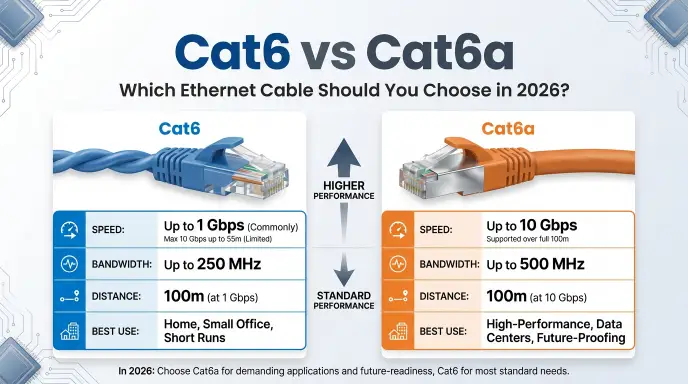
- Cat6: Can support 10 Gbps up to about 55 meters under suitable conditions.
- Cat6a: Supports 10 Gbps up to 100 meters.
- Cat6 bandwidth: Up to 250 MHz.
- Cat6a bandwidth: Up to 500 MHz.
- Cat6a: Generally offers better protection against crosstalk.
- Cat6: Usually costs less and is easier to install.
For example, if you are wiring a small house and your cable runs are well below 55 meters, Cat6 may be the practical choice.
If you are wiring a large office, server room, or building and want reliable 10 Gbps performance over longer runs, Cat6a is often the better option.
The Origin of Cat6 or Cat6a
The terms Cat6 and Cat6a come from Ethernet cable standards.
“Cat” is short for Category. The number identifies the performance category of the cable.
Cat6 came before Cat6a.
The Cat6 standard was introduced to provide higher performance than older Cat5e cabling. It supports higher frequencies and improved performance for modern Ethernet networks.
Cat6a came later as an enhanced version of Cat6. The “a” means augmented.
Cat6a was developed to provide stronger performance at 10 Gbps over the standard 100-meter Ethernet channel.
What Does Cat6 Mean?
Cat6 means Category 6 cable.
It is commonly used for:
- Home Ethernet networks
- Office networks
- Computers
- Network switches
- Routers
- Gaming systems
- Smart TVs
- Access points
- Network storage
Cat6 supports frequencies up to 250 MHz.
What Does Cat6a Mean?
Cat6a means Category 6 augmented.
It increases the bandwidth rating to 500 MHz and is designed for 10 Gbps Ethernet over distances up to 100 meters.
Cat6a is especially useful in professional environments where high-speed networking and longer cable runs are important.
British English vs American English Spelling
There is no British English vs American English spelling difference between Cat6 and Cat6a.
These are technical cable-category names, not ordinary English words.
You should write them as:
- Cat6
- Cat6a
- Category 6
- Category 6A
Both British and American technical writing can use these terms.
Technical Writing Comparison
| Term | Correct Form | Meaning |
| Cat6 | Yes | Category 6 Ethernet cable |
| Cat6a | Yes | Category 6A Ethernet cable |
| Category 6 | Yes | Full name of Cat6 |
| Category 6A | Yes | Full name of Cat6a |
| Cat 6 | Commonly understood | Spaced form |
| Cat 6A | Commonly understood | Spaced form |
The most important thing is consistency.
If you are writing an article or technical document, Cat6 and Cat6a are clear and widely understood forms.
Which Spelling Should You Use?
If you are writing for a technical audience, use Cat6 and Cat6a.
For a general audience, you can introduce the full names first:
Category 6 (Cat6) and Category 6A (Cat6a) are Ethernet cable standards.
After that, simply use Cat6 and Cat6a.
For a US audience, UK audience, or global audience, the technical terms do not need to change.
You may see several forms online, such as:
- Cat6
- Cat 6
- CAT6
- Cat6A
- Cat 6A
- CAT6A
These usually refer to the same cable categories, although professional documents may follow a specific style guide.
Cat6 vs Cat6a: Main Differences
The easiest way to understand cat6 or cat6a is to compare their core specifications.
| Feature | Cat6 | Cat6a |
| Category | Category 6 | Category 6A |
| Bandwidth | Up to 250 MHz | Up to 500 MHz |
| 1 Gbps Ethernet | Up to 100 m | Up to 100 m |
| 10 Gbps Ethernet | Up to about 55 m | Up to 100 m |
| Crosstalk protection | Good | Better |
| Cable size | Usually smaller | Usually thicker |
| Flexibility | Usually more flexible | Usually less flexible |
| Cost | Lower | Higher |
| Best use | Homes and small offices | High-performance networks |
The 10 Gbps distance is one of the most important differences.
Cat6 can handle 10 Gbps, but the supported distance depends on installation conditions and crosstalk. Cat6a is specifically designed to support 10 Gbps up to 100 meters.
Cat6 or Cat6a for Speed?
If speed is your main concern, both cables can support very fast Ethernet.
Cat6
Cat6 can support:
- 1 Gbps Ethernet up to 100 meters
- 10 Gbps Ethernet over shorter distances
This makes Cat6 suitable for many home networks.
Cat6a
Cat6a is designed for:
- 1 Gbps Ethernet
- 10 Gbps Ethernet
- 10 Gbps transmission up to 100 meters
Therefore, Cat6a has a clear advantage when you need 10 Gbps across longer cable runs.
Cat6 or Cat6a for Home Use
For most homes, Cat6 is usually enough.
A typical home does not need 10 Gbps Ethernet across 100-meter cable runs.
You might use Ethernet between:
- A router and computer
- A router and gaming console
- A switch and smart TV
- A router and Wi-Fi access point
- A network storage device and computer
If the cables are relatively short, Cat6 can provide excellent performance without the extra cost and bulk of Cat6a.
When Cat6 Makes Sense at Home
Choose Cat6 if:
- You want affordable high-speed Ethernet.
- Your cable runs are short.
- You need up to 1 Gbps networking.
- You may use 10 Gbps over shorter distances.
- You want cables that are easier to route.
Cat6 or Cat6a for Business Use
Businesses often have different requirements.
A small office may work perfectly well with Cat6.
A larger office, data center, or professional installation may benefit from Cat6a.
Cat6a can be attractive when the network is designed around 10 Gbps connections and longer permanent cable runs.
Cat6a Makes Sense When:
- Cable runs can approach 100 meters.
- 10 Gbps networking is important.
- You are installing new permanent cabling.
- You want additional protection against crosstalk.
- You expect network requirements to increase over time.
Cat6 vs Cat6a for Gaming
Gamers often wonder whether Cat6a will improve gaming.
In most homes, the answer is not necessarily.
If your current Ethernet connection already supports the speed provided by your internet service and network equipment, moving from Cat6 to Cat6a will not automatically reduce ping or make games faster.
The quality of your:
- Internet connection
- Router
- Network switch
- Gaming server
- Ethernet adapter
- Network configuration
can matter more.
For most gaming setups, a good Cat6 cable is more than enough.
Cat6a becomes more useful if you are building a high-speed local network or using 10 Gbps equipment.
Cat6 or Cat6a for 10 Gbps Ethernet
This is where the difference becomes much clearer.
Cat6 can support 10GBASE-T, but its 10 Gbps reach is limited compared with Cat6a.
Cat6a is designed for 10 Gbps transmission across the full 100-meter structured-cabling channel.
10 Gbps Comparison
| Cable | 10 Gbps Capability | Typical Maximum Distance |
| Cat5e | Not generally designed for 10 Gbps | Not the preferred choice |
| Cat6 | Yes | Up to about 55 m under suitable conditions |
| Cat6a | Yes | Up to 100 m |
| Cat7 | Yes | Up to 100 m |
| Cat8 | Yes | Up to 30 m for 25/40 Gbps |
This does not mean you should automatically buy Cat6a.
If your cable run is only 10 or 20 meters, Cat6 may already meet your needs.
Common Mistakes with Cat6 or Cat6a
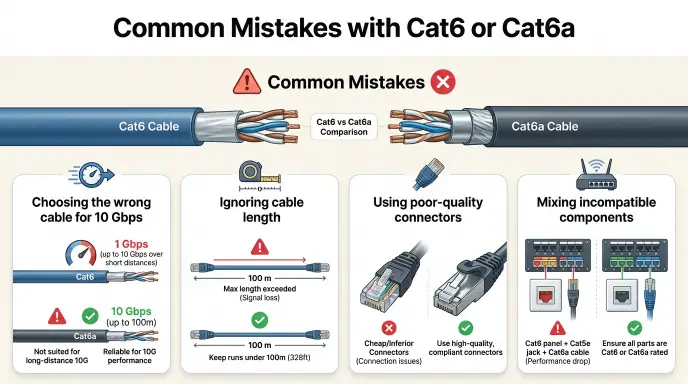
People often make mistakes when buying or installing Ethernet cables.
Mistake 1: Thinking Cat6 Cannot Support 10 Gbps
Cat6 can support 10 Gbps over suitable shorter distances.
The important issue is distance and installation conditions.
Mistake 2: Assuming Cat6a Makes Internet Faster
A cable category does not magically increase your internet plan speed.
If your internet service is 500 Mbps, changing from Cat6 to Cat6a will not turn it into a 10 Gbps connection.
Mistake 3: Buying Cat6a for Every Home
Cat6a is excellent, but its additional performance may not be useful for every household.
It can also be thicker and harder to route.
Mistake 4: Ignoring Connectors
The cable is only one part of the network.
Connectors, patch panels, keystone jacks, switches, network adapters, and other components should support the desired performance.
Mistake 5: Confusing Cable Category With Internet Speed
Cat6 and Cat6a describe cable performance, not your internet subscription.
Your network speed depends on the entire connection.
Cat6 or Cat6a in Everyday Examples
The phrase cat6 or cat6a often appears in practical questions.
Home Installation
Should I use Cat6 or Cat6a when wiring my new house?
This person is choosing between two cable categories.
Office Email
We need to decide between Cat6 or Cat6a for the new office network.
This is a professional infrastructure decision.
Social Media
Cat6 or Cat6a for a 10Gb setup?
This is a short technical question.
Product Search
Cat6a cable 100m
The user likely wants a long Ethernet cable designed for high-speed networking.
Formal Writing
Cat6a may be preferred for installations requiring 10 Gbps Ethernet across longer cable runs.
This is a clear technical statement.
Cat6 or Cat6a : Google Trends & Usage Data
Search interest in cat6 or cat6a is closely related to networking and technology.
People commonly search these terms when:
- Building a new home
- Upgrading an office
- Installing network cables
- Setting up a server
- Building a gaming network
- Planning a 10 Gbps network
- Replacing older Ethernet cables
- Choosing structured cabling
The exact popularity of each search term can vary by country and over time.
Countries with strong broadband, IT, data-center, and home-network markets may show substantial interest in Ethernet cable comparisons.
Search intent also matters.
Someone searching:
Cat6 or Cat6a for home
has a different goal from someone searching:
Cat6 or Cat6a 10Gb 100m
The first user wants general home-network advice. The second is likely planning a high-speed network.
Cat6 vs Cat6a Installation
Installation is another important difference.
Cat6a cables are often thicker because they need to meet stronger performance requirements.
This can make them:
- harder to bend,
- harder to fit into tight spaces,
- more difficult to terminate,
- and sometimes harder to organize in a crowded network cabinet.
Cat6 is often easier to handle.
For a home DIY project, this can be a meaningful advantage.
For professional structured cabling, the additional size of Cat6a may be acceptable because the installer is planning the cable pathways in advance.
Cat6 or Cat6a: Cost Comparison
Cat6 generally costs less than Cat6a.
However, the final project cost includes more than the cable.
You may also need:
- Ethernet connectors
- Keystone jacks
- Patch panels
- Network switches
- Patch cables
- Cable management
- Installation labor
If you need 10 Gbps over long distances, spending more on Cat6a can make sense.
If you only need standard gigabit networking, Cat6 may provide better value.
Cat6 or Cat6a for Future-Proofing
Future-proofing is one reason people choose Cat6a.
Technology changes quickly.
A network that feels fast today may seem limited several years from now.
If you are already opening walls or installing permanent cable, replacing the cable later can be expensive.
Cat6a gives you stronger support for 10 Gbps over the full 100-meter channel.
That can make it a smart choice for new construction, offices, and long-term infrastructure projects.
However, future-proofing should be balanced against your actual needs.
There is no benefit in spending significantly more if your network will never need the additional capacity.
Cat6 or Cat6a: Which One Should You Choose?
Use this simple guide.
Choose Cat6 If:
- You are wiring a normal home.
- Your cable runs are short.
- You need gigabit Ethernet.
- You want lower cost.
- You want easier installation.
- You may use 10 Gbps over short distances.
Choose Cat6a If:
- You need 10 Gbps over up to 100 meters.
- You are installing a professional network.
- You are wiring a large office.
- You want stronger crosstalk performance.
- You are installing permanent cabling for long-term use.
- The extra cost and cable thickness are acceptable.
Cat6 or Cat6a: Simple Decision Table
| Your Situation | Recommended Choice | Why |
| Small home | Cat6 | Affordable and capable |
| Gaming PC | Cat6 | Usually more than enough |
| Smart TV | Cat6 | More than sufficient |
| Small office | Cat6 | Good balance of cost and performance |
| 10 Gbps under 55 m | Cat6 | Can meet the requirement under suitable conditions |
| 10 Gbps up to 100 m | Cat6a | Designed for this use |
| Large office | Cat6a | Better for high-performance structured cabling |
| New commercial building | Cat6a | Stronger long-term option |
| Tight cable pathways | Cat6 | Easier to handle |
| Future-focused 10 Gbps network | Cat6a | Better long-distance 10 Gbps support |
FAQs :
Q1: Is CAT6a worth it over Cat6?
Yes, CAT6a is worth it if you need faster speeds over longer distances and better protection against interference. It costs more than Cat6, but it delivers consistent 10 Gbps performance up to 100 meters, making it a smart long-term investment for businesses, data centers, and anyone future-proofing their network.
Q2: Which cable is better, Cat6 or CAT6a?
CAT6a is technically better because it offers higher bandwidth, longer range at full speed, and superior shielding against crosstalk. However, Cat6 remains a great choice for home users and small offices where budget matters more than maximum performance.
Q3: Is Cat6 overkill for home use?
No, Cat6 is not overkill for home use : it’s actually a well-balanced option. It supports gigabit speeds reliably and even handles 10 Gbps over shorter distances, making it more than enough for streaming, gaming, and everyday internet browsing.
Q4: Which is faster, Cat6 or CAT6a?
CAT6a is faster over longer distances because it maintains 10 Gbps speeds up to 100 meters, while Cat6 only reaches that speed within 55 meters. Beyond that range, Cat6 drops to 1 Gbps, whereas CAT6a keeps performance consistent throughout the full cable length.
Final Conclusion:
When choosing cat6 or cat6a, the right answer depends on your network goals rather than simply choosing the newer or more expensive cable.
Cat6 is a strong choice for most homes, gaming setups, small offices, and standard Ethernet networks. It supports gigabit Ethernet over normal structured-cabling distances and can also support 10 Gbps over shorter runs. It is usually less expensive, easier to handle, and more flexible than Cat6a.
Cat6a has a clear advantage when you need 10 Gbps Ethernet across longer distances. It is designed to support 10 Gbps over a full 100-meter channel and offers higher bandwidth and improved crosstalk performance. This makes it attractive for offices, server rooms, commercial buildings, and new installations designed for long-term use.
Do not choose Cat6a simply because it has a higher number. First consider cable length, network hardware, required speed, installation space, and budget.
For a typical home, Cat6 is often the smart and practical choice. For long-distance 10 Gbps networking and professional infrastructure, Cat6a is usually the better option.
Related Articles!

I’m James Mitchell, a language and content writer focused on grammar, spelling, word usage, and everyday English. I enjoy making confusing words and common language questions simple and easy to understand.